TikTok is where a lot of people start when they try to cut back, and it’s built for that to be hard. The For You feed has no bottom, the next video is already playing before you decide anything, and there’s no point where the app suggests you’ve reached the end. Opening it is one decision. Everything after that is the app’s.
So the fix that works isn’t a better decision inside the app. It’s moving the decision to before the app opens, and making it cost something.
What TikTok gives you, and why it doesn’t hold
TikTok does have a built-in limit, and it’s worth knowing exactly what it does. In the app, go to Settings and privacy, then Time and well-being, then Screen time, then Daily screen time. It’s switched on at one hour for accounts aged 13 to 17, and off for adults.
Here’s what happens when you reach it, in TikTok’s own help-center words: you “can choose to close TikTok or enter the on-screen passcode to return to it.” The passcode is printed on the screen that’s supposed to stop you. It’s a speed bump with the instructions for getting over it painted on top.
There are softer tools too. Sleep hours mutes TikTok’s notifications after your bedtime and nudges you to take a break, and for teens a guided meditation interrupts the feed after 10pm. Family Pairing is the genuinely strict version: a parent sets the limit from their own phone and gets a random passcode you don’t know. That’s built for parents and teens, not for an adult managing themselves.
What your iPhone gives you
Apple’s Screen Time can set a daily limit on TikTok from outside the app. When you hit it on iOS 26, the “Time Limit” screen offers “Ignore Limit”, then “One More Minute”, “Remind Me in 15 Minutes” or “Ignore Limit For Today”. Apple’s guide is blunt about it: by default, limits can be ignored once reached.
You can harden it with a Screen Time passcode and Block at End of Limit, which this guide walks through. If someone else sets that passcode, it works. If you set it, you know it, and it becomes four digits between you and the For You page.
Locking TikTok behind a walk instead
A step gate changes what the exit costs. Instead of a passcode or a button, the price of opening TikTok is a number of steps your phone has already counted, or hasn’t. There’s nothing to argue with at 11pm, because the argument happened earlier, on your feet.
Setting it up in WalkGate takes about a minute:
- Install WalkGate and allow Screen Time access when iOS asks. That’s what lets it lock apps at the system level, the same way parental controls do.
- Pick TikTok in Apple’s own app picker. On the free plan, it’s your one locked app.
- Set a daily step goal. Start lower than you think; you can raise it once it’s easy.
- Choose a mode. Full Unlock opens TikTok for the rest of the day once you hit the goal. Earn Minutes makes every 100 steps buy a minute.
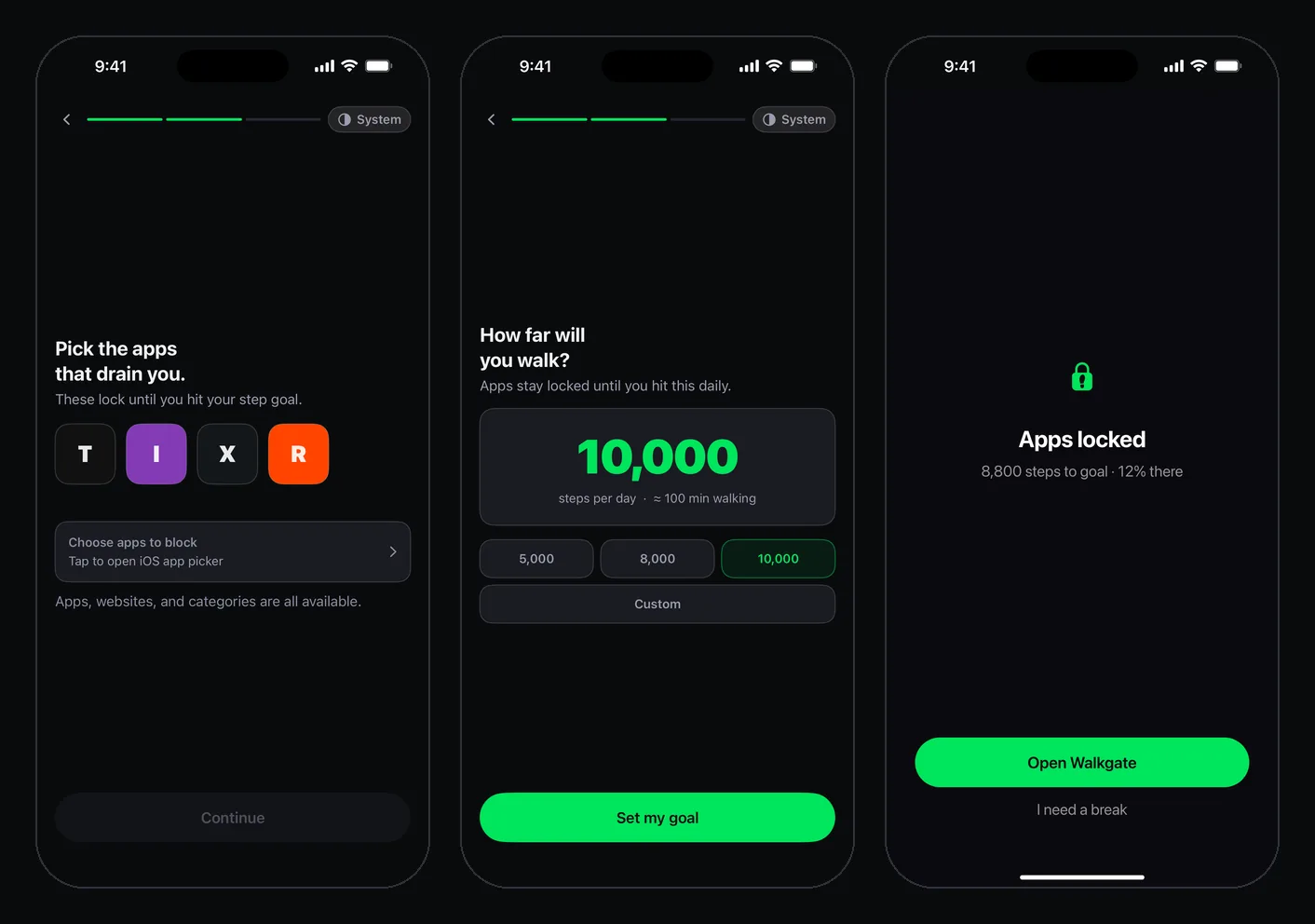
From then on, opening TikTok before you’ve walked shows a block screen with the exact distance left: “Apps locked”, then something like “1,760 steps to goal · 82% there”. Not a lecture, just a number. Walk it and TikTok opens on its own.
The honest exits
No blocker on iPhone can trap you, and you shouldn’t want one that could. WalkGate’s exits are deliberate rather than absent. You get one 10-minute break a day, and starting it takes a 5-second press-and-hold, which is long enough to notice what you’re doing. You can also pause blocking in Settings, but that resets your streak and opens everything at once.
Locking the app also doesn’t cover tiktok.com in Safari. If that’s where you drift next, block the website too in Screen Time’s Content and Privacy Restrictions.
Why lock it instead of deleting it
Deleting TikTok is a fine experiment, and “This is your sign to delete TikTok” has over three thousand upvotes on r/digitalminimalism. The pattern that often follows is less fine: the scroll moves to Reels, Shorts or Reddit within days, because the habit was never about TikTok specifically. Deleted TikTok and still scrolling? goes into why.
Locking keeps TikTok where it is and changes the terms. You can still watch the thing your friend sent. You just have to have walked first, and most days that means you’ll have done something with your morning before the feed gets a say.
If you want to know what TikTok actually costs you per year before you decide, the screen time calculator turns your daily average into days and years. Your iPhone’s Screen Time report has the daily number; it’s usually worse than you guessed.