The problem with YouTube Shorts is that it lives inside something you actually need. Deleting TikTok costs you TikTok. Deleting YouTube costs you the tutorial for fixing your sink, the lecture you’re halfway through and the music you work to. So people keep YouTube, and Shorts keeps them.
That’s why a thread on r/digitalminimalism that simply asks how to remove Shorts has 169 comments. Here’s the current answer, including the part YouTube added recently.
YouTube now has a Shorts limit, and it goes to zero
In October 2025 YouTube added a Shorts feed limit, and in April 2026 it rolled out the option to set it to zero for everyone on iOS and Android. In the YouTube app: tap You, then Settings, then Time management, then Shorts feed limit.
Set it to zero. It’s free, it takes ten seconds, and it’s the right first step for anyone whose YouTube problem is specifically Shorts.
Then read the fine print on YouTube’s own help page: when you reach the limit, “you will be prompted with an option to dismiss or ignore your set limit.” For an adult account it’s a reminder with a dismiss button, which puts it in the same family as Apple’s Ignore Limit. One test of the zero setting also found the Shorts tab still there, showing a message rather than disappearing. It interrupts the reflex. It doesn’t remove the option.
Two smaller levers help alongside it. On the Home feed, the menu on a row of Shorts has Show fewer Shorts. And Remind me to take a break and Remind me when it’s bedtime, under Settings, General, both work for adults if you switch them on.
When the limit isn’t enough
If you set the limit to zero and find yourself dismissing it most evenings, the reminder has become part of the ritual. That’s the point to move the decision outside YouTube.
Apple’s Screen Time can limit the YouTube app, but its “Time Limit” screen also ends in “Ignore Limit” unless someone else holds a passcode (here’s the setup if you want to try). The alternative is a blocker that uses the same system-level lock and charges something real at the door.
Lock YouTube behind a walk
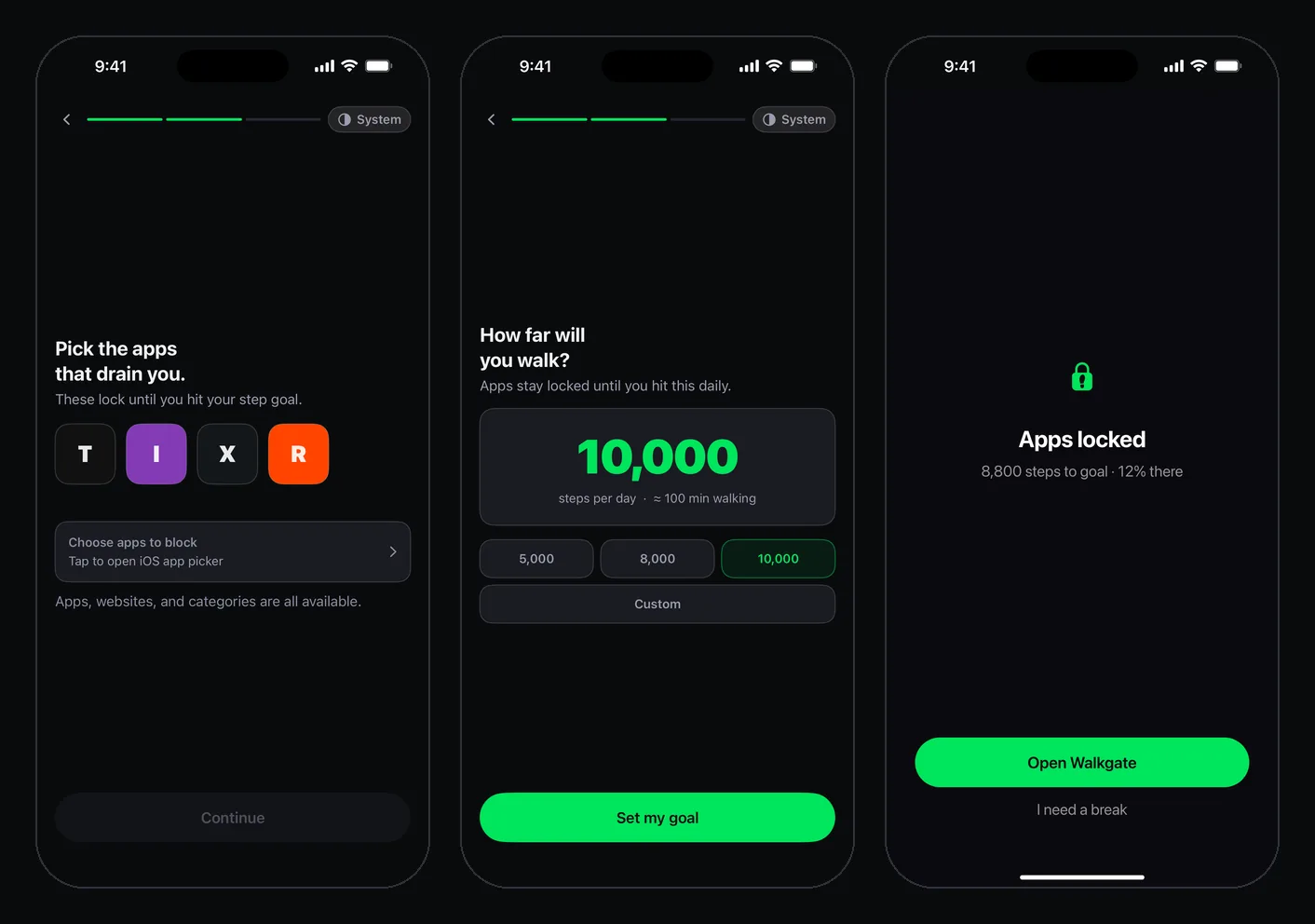
iOS doesn’t let any blocker lock one feed inside an app, so the honest version of “block Shorts” on iPhone is locking YouTube itself, with an unlock you control. WalkGate keeps YouTube shut until your Apple Health step count reaches your daily goal.
- Install WalkGate and allow Screen Time access when iOS asks.
- Pick YouTube in Apple’s app picker. The free plan covers one app.
- Set a step goal you’ll still clear on a lazy day.
- Choose Earn Minutes if you use YouTube for specific things: every 100 steps buys a minute, so a walk buys the lecture, not the evening. Choose Full Unlock if you’d rather earn the whole day in one go.
The two together work well: the Shorts limit at zero for the times YouTube is open, and the walk deciding when it opens at all.
The morning and night version
A lot of Shorts happens at the edges of the day: first thing in bed, last thing before sleep. One of the r/nosurf threads above is exactly that. A step gate is strongest in the morning, because YouTube is already locked when you wake up and a short walk is the key. Stuck in bed scrolling every morning goes deeper on that pattern.
At night, Earn Minutes fits better than Full Unlock. Full Unlock leaves YouTube open until midnight once you’ve hit your goal; with Earn Minutes, the minutes you walked for run out, and the feed stops with them.
The exits
You get one 10-minute break a day, behind a 5-second press-and-hold. You can pause blocking in Settings, which resets your streak and opens everything. And youtube.com in Safari isn’t covered by locking the app, so if you start watching there, block the site in Screen Time’s Content and Privacy Restrictions too.
If you want to see what an hour of Shorts a day adds up to, the scroll-to-steps calculator converts it into the steps you’d have walked in the same time. It’s a more motivating number than the one in your Screen Time report.